Logging What I Eat Without Logging What I Eat
I can tell you how many kilometers I ran in March and how many days I spent in Vietnam, but until now I could not tell you what I had for lunch on Tuesday.
I am used to measure almost everything. My personal dashboard, a small Streamlit application running on a Mac mini at home, pulls my runs and my sleep from Garmin, my weight from Withings and my whereabouts from Google Timeline. I can tell you how many kilometers I ran in March, how my resting heart rate evolved during the last year or how many days I have spent in Germany since 2012. But there was always a hole in the middle of all this data: food. I could not tell you what I had for lunch on Tuesday, how many calories I eat in a normal week, or for how many hours I fast every night.
The reason is simple. I have tried calorie counting apps several times, and I always quit after a couple of weeks. Searching for “arroz con pollo” in a database, choosing between seventeen variants and estimating the grams of every single ingredient is the kind of friction that kills a habit. There is, however, one thing I already do almost every time I eat: I take a photo of the plate. My phone uploads it to Immich, the self-hosted photo library that also runs on the Mac mini. The data was there all the time, just not in a format I could use.
So the idea was the following: let a machine look at my food photos every evening, figure out what I ate, estimate the calories and macros, and only bother me when it is not sure. Logging what I eat, without having to log what I eat.
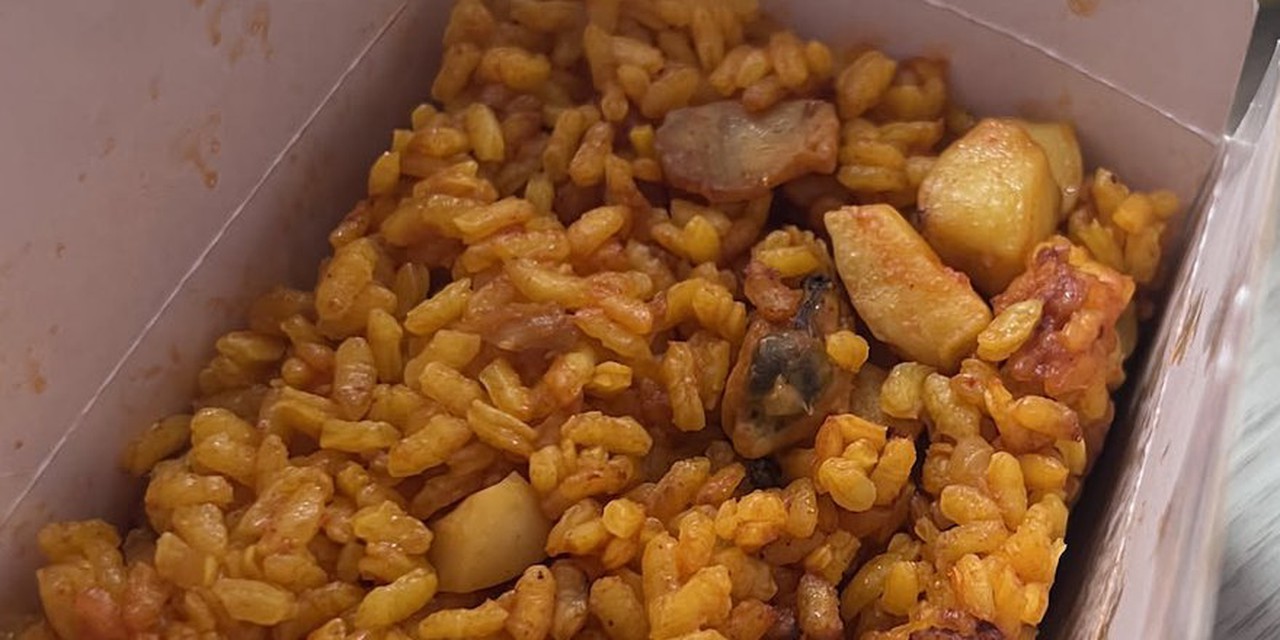
The photo on top of this article is the first meal the system logged on its own: a takeaway paella I had today, with a lemon Fanta. It was recognized as a paella with no meat I do not eat, around 500 kcal, eaten out, without asking me anything.
The architecture
The whole system lives on the same Mac mini, and it is made of a nightly job, a Telegram listener and a new page in the dashboard. Nothing of it runs in the cloud, except an optional second opinion I will explain later.
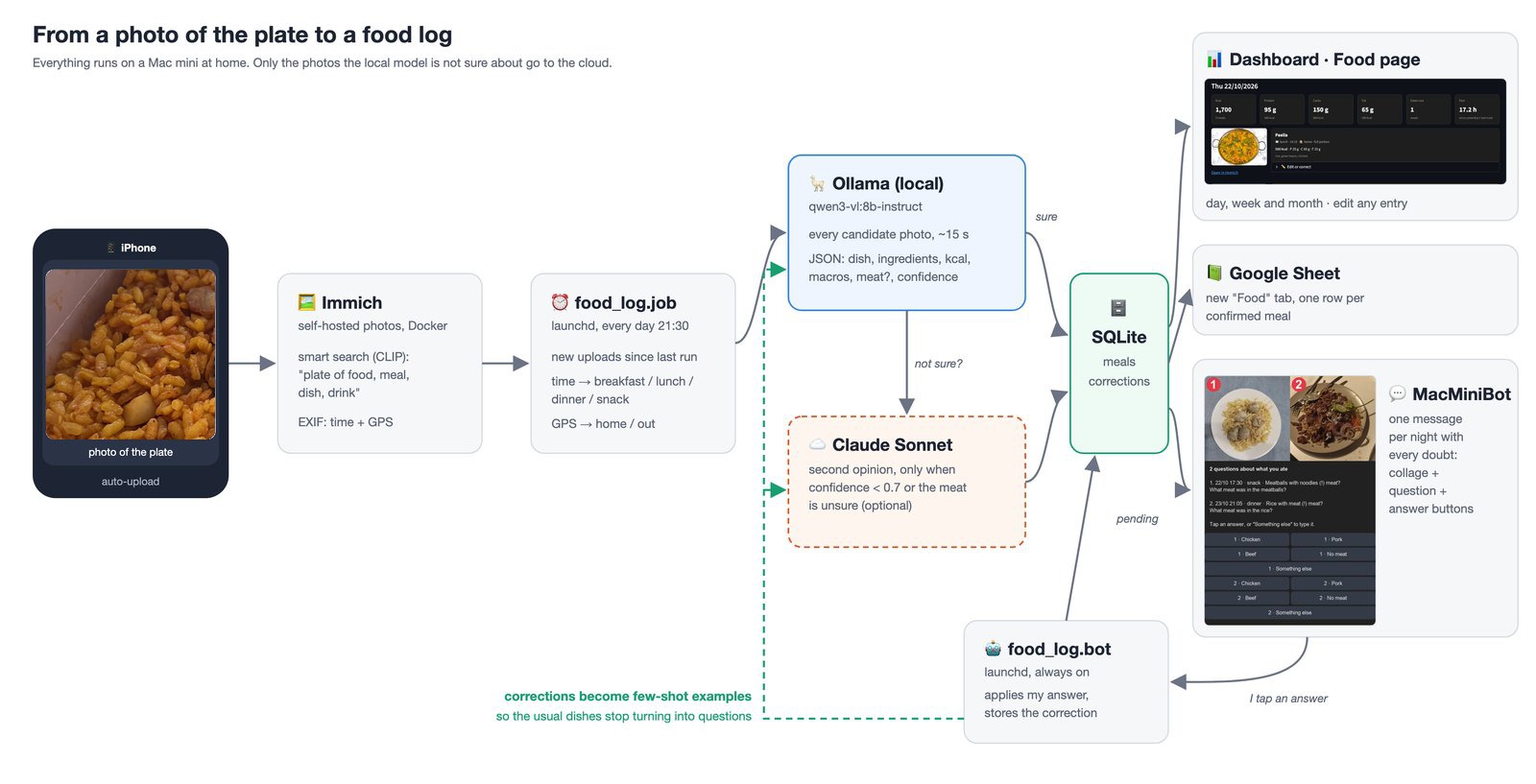
The whole pipeline. The green dashed line is the learning loop: every answer I give ends up in the next prompts.
Every evening at 21:30, launchd starts a Python job. It asks Immich for the photos uploaded since the previous run, and uses Immich’s smart search (the CLIP embeddings it already computes for every photo) with a query like “plate of food, meal, dish, drink”. Smart search does not filter, it ranks: it returns every photo in the time window ordered by how much it looks like food. The top candidates go to the vision model, and is the model the one that decides what is food and what is a photo of my kitchen floor. If I want to be more strict, a single setting makes the job read only an album called “Food” instead.
For every candidate the model returns a small JSON document: whether it is food at all, the name of the dish, the ingredients, an estimation of calories, protein, carbohydrates and fat, the portion (whole, half or shared), and a confidence between 0 and 1. The time and the GPS coordinates of the photo come from the EXIF data that Immich already extracted, and they give me the rest for free: a photo at 8:30 is breakfast, one at 21:00 is dinner, and a photo taken more than 150 meters away from home means I ate outside.
A local model first
I wanted the default to be local. My food is, after all, quite personal data, and I do not need a frontier model to recognize a paella. The Mac mini has an M4 and 24 GB of memory, and a big part of that memory is already taken by LM Studio, which keeps a 26B model loaded for my Local AI Bridge. The largest vision model that fits next to it is Qwen3-VL with 8 billion parameters, running in Ollama.
Here I learnt my first lesson of the project. The default qwen3-vl:8b tag in Ollama is the thinking variant, and it ignores the request to not think: it was spending more than a thousand tokens reasoning about whether a paella is a paella before answering, around a hundred seconds per photo. The qwen3-vl:8b-instruct variant answers the same JSON, with the same quality for my test photos, in fifteen to twenty seconds. Ollama also supports structured outputs, so I pass the JSON schema directly and the model can not produce anything that does not parse. When the run is finished the job unloads the model, so the memory goes back to LM Studio.
This is how a normal day looks like in the dashboard once the job has run. The paella was recognized by the local model with a confidence of 0.95: rice, green beans and chicken, around 500 kcal, no meat I do not eat. The meatballs in the afternoon were a different story, and that is the next section.
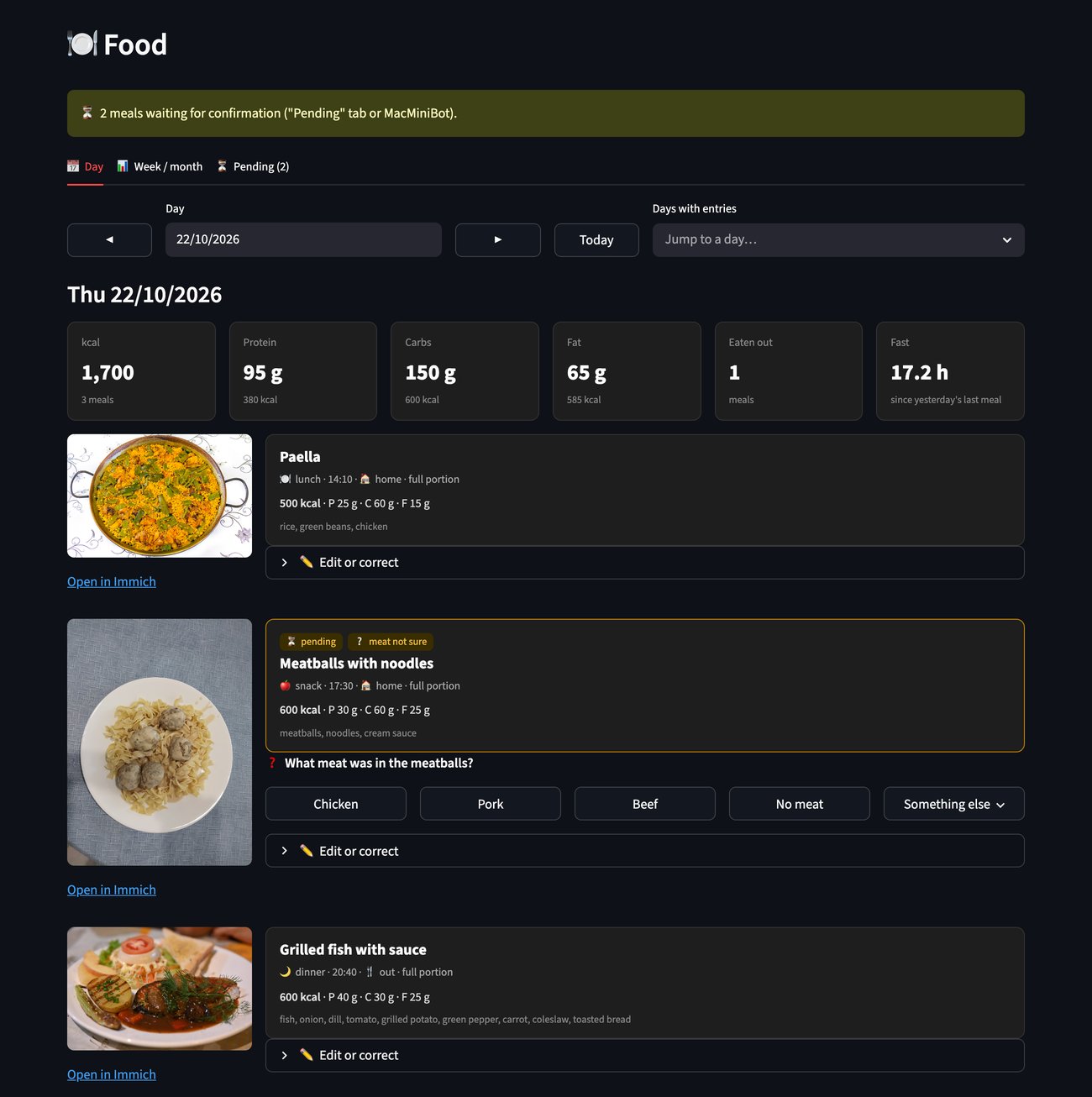
The daily view of the “Food” page: totals of the day, the overnight fast and every meal with its photo, macros and place. The entries were produced by the local model from sample photos (credits at the end).
When the local model is not confident, the same photo with the same prompt goes to Claude Sonnet, which is were the second opinion comes in. This is optional and capped at a few calls per night, and in practice most of the photos never leave the house.
Asking only when it matters
There is one thing that is more important for me than the calories: I do not eat pork, beef or any other red meat. Poultry, fish and seafood are fine. A burger in a restaurant, meatballs or a dumpling filling can be any of them, and a model that guesses “chicken” just because I usually eat chicken is worse than useless. So the prompt is very explicit about it, and the model has three options for the meat: yes, no, and unsure.
If the confidence is below 0.7, or the meat is unsure, the entry does not get confirmed. Instead, the model writes one concrete question and two to four possible answers. For a plate of rice with some unidentified meat, the question is “What meat was in the rice?”, with the options “Chicken”, “Pork”, “Beef” and “No meat”.
All the open questions of the day are sent as one single message through MacMiniBot, the Telegram bot that already sends me my morning summary. Telegram does not allow inline buttons on an album of photos, so the job builds a numbered collage of the photos, puts the questions in the caption and adds a row of buttons per photo: the suggested answers, plus “Something else” to type a free answer. A small listener running under launchd processes the button presses, sends the photo and my answer back to the model to rewrite the entry, removes the buttons of that photo and, when everything is answered, marks the message as solved. Since the morning bot only sends messages and never reads updates, the listener can be the only reader of the bot without stepping on anybody’s toes.
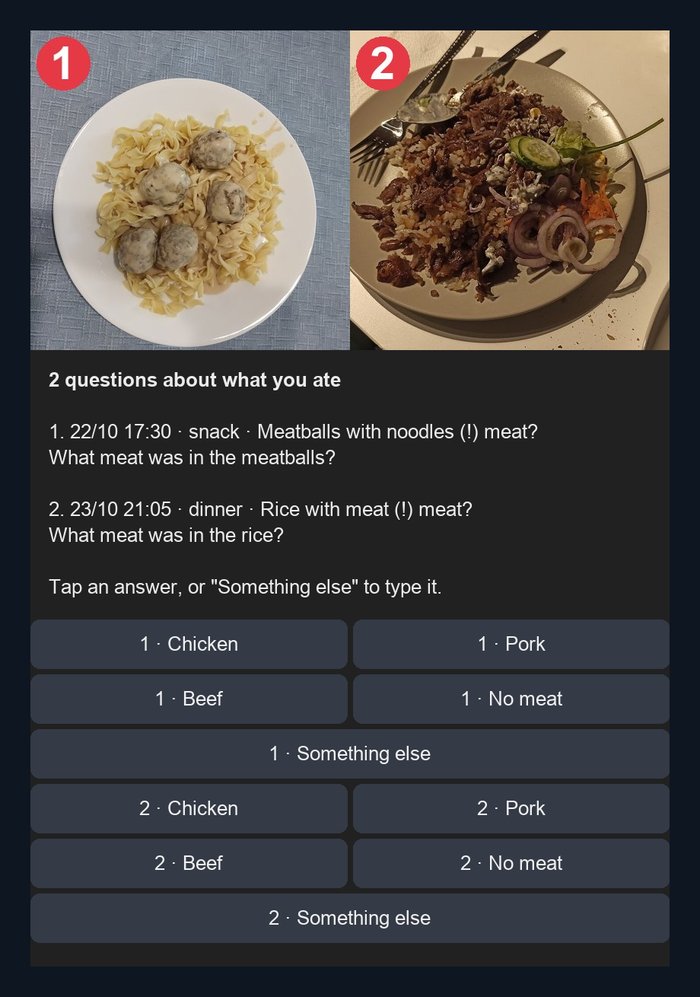
The message of the night with two open questions. Meatballs and döner meat can be chicken, turkey or beef, so the model asks instead of guessing.
Learning from my answers
Every answer I give, on Telegram or in the dashboard, is stored as a correction: what the model understood, what it asked, what I answered and how the final entry looked like. The next night those corrections are part of the prompt, together with the list of dishes I eat most often and their usual macros. It is a very humble form of learning, few-shot examples rather than fine-tuning, but it works for what I want: after I explained once that the brown thing in my Tuesday bowl is tofu, the model should not ask me again every Tuesday.
The dashboard
The new “Food” page of the dashboard shows each day in order: the thumbnail of the photo (served from Immich), the dish, the type of meal, where I ate and the macros, together with the totals of the day. A weekly and monthly view plots the calories and the macros per day, how many times I ate outside and how many hours I fasted every night, which is simply the time between the last meal with a photo of one day and the first one of the next.
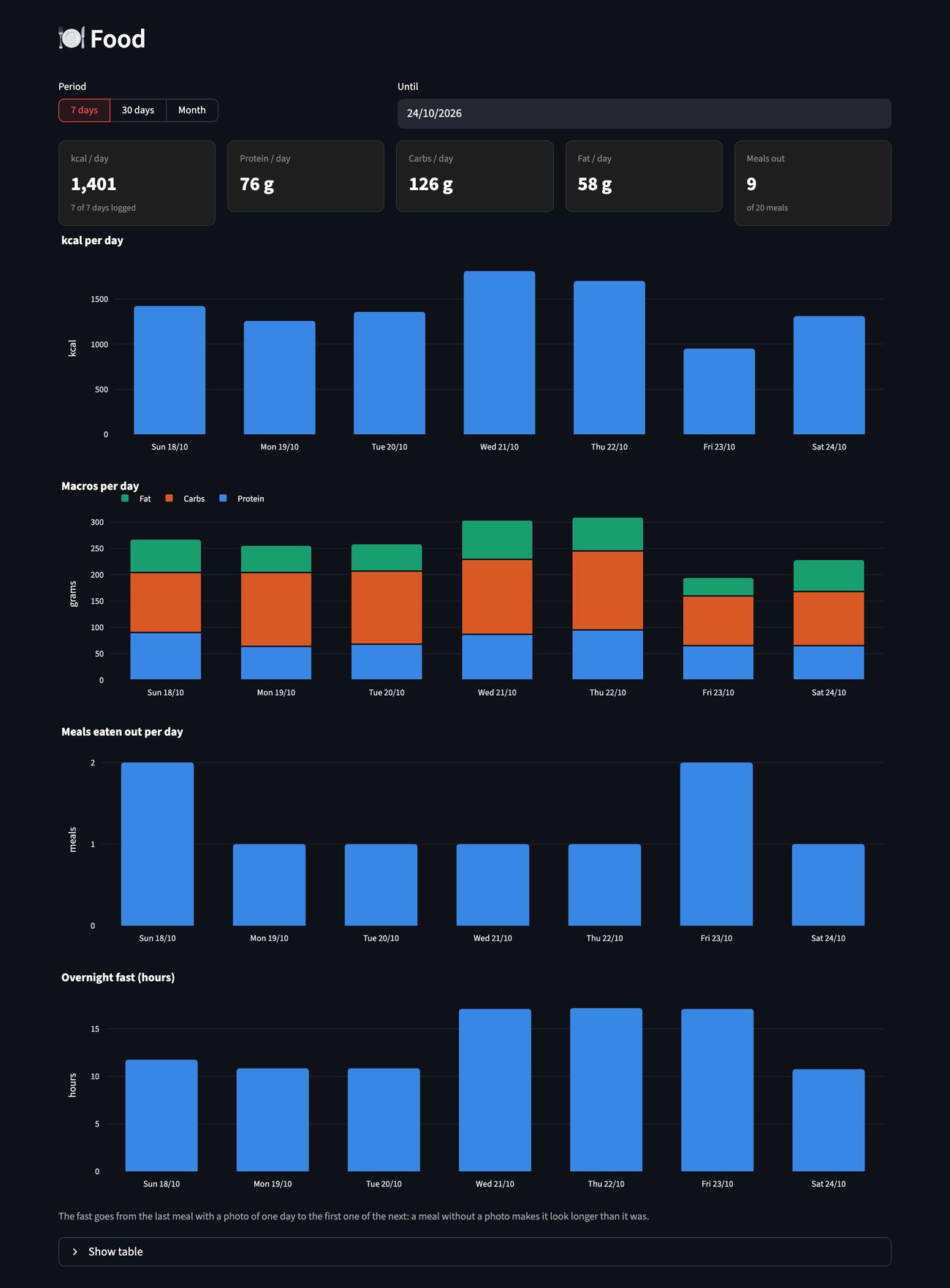
The weekly view: calories, macros, meals out and the overnight fast per day (sample data for the screenshot).
Any entry can be edited, recalculated with a hint, or thrown away if it was not food, and those edits also feed the corrections. And there is a red warning on top if any record contains meat I do not eat, because if that happens I want to know it, whatever the reason.
The confirmed meals also go to a new “Food” tab of the Google Sheet where I track my investments, so I can play with the numbers in a spreadsheet as I do with everything else.
A few lessons
Building this took an afternoon, and most of the interesting problems were not the ones I expected. Some notes for whoever wants to build something similar:
- The calories are estimations, and that is fine. A photo can not tell you how much oil went into the pan. What I want is a trend and a consistent baseline, not a laboratory measurement. The fasting numbers have the same limitation: if I forget to photograph a snack, my fast looks longer than it was.
- A dry run is worth gold. The job has a
--dry-run --datemode that analyses one day and writes nothing. The first time I ran it over three days it found exactly zero meals, and it was right: the best matches for “plate of food” were photos of my kitchen and two screenshots of my broker. - Ask once, ask well. The first version of the prompt produced questions like “is the chicken fresh or processed?”, which changes nothing in the entry. Telling the model to only ask about what changes the record (the dish, the meat, the portion) made the questions short enough to answer with one tap.
It is early to say if this will survive more than the two weeks my previous attempts did, but this time the habit I need to keep is one I already had: taking a photo of the plate. The rest happens while I sleep, or more precisely, while I am having dinner.
Photo credits for the screenshots (the cover is my own): Paella Valenciana by Jan Harenburg (CC BY-SA 4.0), seared salmon by PattayaPatrol (CC BY-SA 4.0), döner kebab plate by Almanta (CC BY-SA 4.0) and Swedish meatballs by RandomKatze (CC0), all from Wikimedia Commons.


If you have liked this article or if it did help you, feel free to share, 👏 it and/or leave a comment. This is the currency that fuels amateur writers.